
•
Where have I Too Good To Gone?
By Max Katz-Christy • 10 minutes read •
There are some software things in here… but don’t be scared you might surprise yourself and understand more than expected!
- The Too Good to Go API is likely not meant for this use
- Whoopsies!
Table of Contents
An Addict
Gambling is very addictive. I have an addictive personality. Not to be left out of the surge in online gambling, I have spent $\$2079$ in an online casino where the only possible reward is food. This addiction has caused me to run, bike, and train for miles towards pickup locations in a variety of far flung places all over the US and Europe.
Too Good to Go is a platform where restaurants can post “surprise bags”, usually leftover food, for around a third of the original price that can be picked up in limited numbers at given times.
While I’m not a huge fan of most big companies, Too Good To Go is one of my favorites.

If it were just for the food alone, I don’t know if I would be winning. I spend lots of time and energy collecting the food. I don’t know if there’s any hunter/gatherer left in our DNA, but I definitely get some sort of rush every time I snag a highly rated bag in a new city or when I open up the bag to see what I’ve “saved”.

While solo traveling, using TGTG gives me a sense of purpose and gives me an excuse to explore the city in ways that not many others do. And of course, the off chance encounters with other too good to goers is quite interesting.
I am not gonna be like an influencer and say “Have you ever had an interesting experience picking up a TGTG? Tell me about your craziest experiences in the comments!” just to drive up my ranking with the algorithm. But like… You totally can if you really want, I won’t stop you. Regardless, I think the only algorithm it might possibly effect is Google’s SEO. Anyways, it’ll be fun to try this Mastodon comments section
The Problem
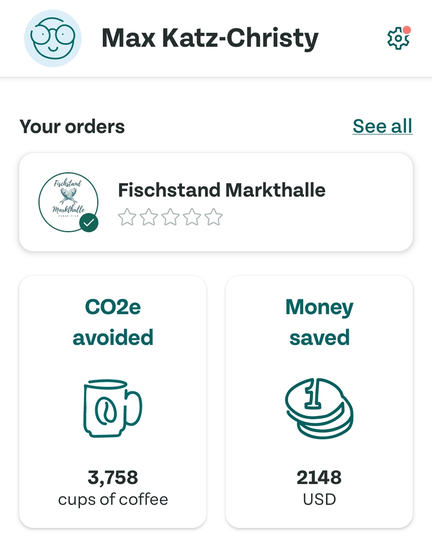
The stats in the Too Good To Go app are pretty limited. Also, they also seem to be incorrect. I’ve saved $\$2148$? This baffled me, because I’ve spent almost the same, so it should be $\sim2\times$.
However, when I was calculating my spending, at first I got some crazy high numbers. I found the places where it looked like I was spending an arm and a leg… All in Scandinavia… Where they have Monopoly money! Their number is about accurate if you remove all non USD bags.
And then CO2e avoided… In cups of coffee? More importantly, I’ve avoided $3758$ cups of coffee. Climate change is a government hoax anyways, lets download some data.
So. I want the data. Too good to go, will you give me the data? Not willingly.
We gotta do this ourselves. Always start with the naive approach. In the app, I can tap on every previous order and then the store, then write down where it was and stuff.
Obviously I don’t have time for that, I’m a busy guy.

Existing “Research”
Ok, so we need help. Maybe someone has already figured out how to download the data?
There’s a Too Good To Go python package which I used a while ago to get notifications when bags were posted, let’s see if that works.
This is where you less technical people are going to ask wtf you’ve gotten yourself into, but trust me, there’s a really fun map at the end, so hang in there. This blog will attempt (and possibly fail) to bridge the technical gap.
If you REAALY want to skip ahead, you can, but you have to press this button: PRESS FOR BAD LUCK
The following is called an error. We’ve tried to run a piece of code to test the login process. Most of this is garbage I posted just so people would think I’m smart. There’s only two words that matter here: TgtgLoginError and 403
$ python login_test.py
Using version 26.2.1
Traceback (most recent call last):
  File "/home/maxtkc/Documents/home-docker/random/login_test.py", line 4, in <module>
    client.get_credentials()
    ~~~~~~~~~~~~~~~~~~~~~~^^
  File "/home/maxtkc/.pyenv/versions/3.25.1/lib/python3.25/site-packages/tgtg/__init__.py", line 91, in get_credentials
    self.login()
    ~~~~~~~~~~^^
  File "/home/maxtkc/.pyenv/versions/3.25.1/lib/python3.25/site-packages/tgtg/__init__.py", line 178, in login
    raise TgtgLoginError(response.status_code, response.content)
tgtg.exceptions.TgtgLoginError: (403, b'{"url":"https://geo.captcha-delivery.com/interstitial/?initialCid=blablabla..."}')

What is 403? It’s an internet response code for an authentication failure.
Easy way to troll a dork is answer any question they have by saying 403, because they’ll both respect you and be pissed at the same time.
Have you been to a website that makes you identify which of the grainy pictures shows a bus, and you have to decide if the bigish van qualifies as a bus or not, risking your qualifications as a real human? That’s a CAPTCHA, standing for, and I’m not kidding, “Completely Automated Public Turing test to tell Computers and Humans Apart”
This person made a notification system that seems to work… And it looks like they’ve taken the previous persons work and improved it.
$ python test_what_works.py
Testing what endpoints work...

1. Testing get_items (favorites):
✓ get_items works - got 5 items
  Sample item keys: ['item', 'store', 'display_name', 'pickup_interval', 'pickup_location', 'purchase_end', 'items_available', 'distance', 'favorite', 'subscribed_to_notification', 'in_sales_window', 'new_item', 'item_type', 'matches_filters', 'item_tags']

2. Testing get_active:
✓ get_active works
  Response keys: ['current_time', 'has_more', 'orders']
  Full response: {
  "current_time": "2026-02-20T01:15:53.948770426Z",
  "has_more": false,
  "orders": []
}

3. Testing discover/v1/bucket:
✗ Bucket 'History' failed: (400, b'{"errors":[{"code":"VALIDATION_ERROR"}]}')
✗ Bucket 'Orders' failed: (400, b'{"errors":[{"code":"VALIDATION_ERROR"}]}')
✗ Bucket 'PastOrders' failed: (400, b'{"errors":[{"code":"VALIDATION_ERROR"}]}')
✗ Bucket 'CompletedOrders' failed: (400, b'{"errors":[{"code":"VALIDATION_ERROR"}]}')
✗ Bucket 'RedeemedOrders' failed: (400, b'{"errors":[{"code":"VALIDATION_ERROR"}]}')
Wheee! It mostly works… But wait, they don’t have the history endpoint included? No one has done this before? We are entering uncharted territory…
Also, what is an endpoint? Well, TGTG has an API server in the cloud – hold on, lets slow this down
Brief overview of what an API Server is

You can do it! You’re almost there! After this you can add
pythonto your LinkedIn skills and all your friends will ask you to fix their printers.
When you open your app on your phone, it has to ask TGTG for data. For instance, in the map view, it has to ask for all of the available bags.
To ask for these things, your phone (technically a computer) asks the TGTG server (just a beefier computer that has a URL on the internet).
An API is a structured way of requesting data. TGTG has many APIs so the phone can ask questions like, what bags are available in this area and what bags does this store have.
They must have one to answer what bags have I picked up, but they don’t document it anywhere, so we gotta figure it out.
Reverse Engineering
This is a vague reenactment of the process that I went through to figure out how my phone was getting the past orders.
In the beginning
Phone: I would like to connect securely with Too Good to Go
Me: And I’m going to listen in!
Too Good to Go: Ok, I am too good to go, here is my certificate saying so! It is mathematically signed by Let’s Encrypt 💪
Phone: Ok, i’ll use your certificate to send you secret messages no one can see
Me: Ist das Deutch?! Scheiße.
[Scene]
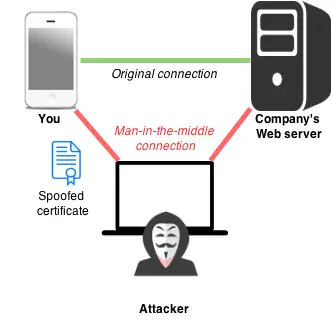
Ok, we’ve got to be the attacker in this diagram. Lets use mitmproxy! Then we’ll be able to see everything.
A proxy is a computer we can send messages through that can read them before sending them on. It’s like a game of telephone (but hopefully with less data loss).
With the proxy
Phone: I would like to connect securely with Too Good to Go
Me: And I’m going to listen in!
Proxy: Ok, I am too good to go, here is my certificate saying so! I signed it myself!
Phone: WTF this shit is bogus, no, I don’t trust you at all
Me: Drat, foiled again.
[Phone exits stage right]
When the app tries to connect securely with TGTG, it uses SSL. SSL puts the s in https (I could write ads for them)

Every website that supports https has a certificate. Think of this like a passport. Passports are given out by different countries. Different countries use fancy techniques when they print them so that people trust that the person can prove their identity through this passport.
Instead of fancy printing techniques, websites get their certificates mathematically signed by a Certificate Authority (CA).
Website = Person
Certificate = Passport
Certificate Authority = Country

When you connect to a website, you check the websites passport AKA certificate before trusting them with your nudes. Also, you might trust some countries more than others. Maybe you don’t want to send your nudes to the Russians… So you have a list of countries that you trust passports from.
Every device comes packed with a list of trusted CA’s. So, when a device connects to a website, the first thing it does is check the websites passport. If the website doesn’t provide a mathematically signed passport/certificate by a trusted country/CA, then it stops.
So… Back to the play. Why doesn’t the phone trust the proxy? The proxy not even a real country, it’s just pretending to be TGTG. It’s made itself a fake TGTG passport for it’s own made up country, and the phone doesn’t trust passports from that country.
With the proxy certificate authority installed
[Phone enters, holding a stack of trusted certificate authorities]
Phone: I would like to connect securely with Too Good to Go
Proxy: Ok, I am too good to go, here is my certificate saying so! I signed it myself!
[Phone looks through certificates]
Phone: Ahh I found one that works, but I don’t trust it. I pinned a few certificates that I support, and you can’t change them, sorry.
[Phone exits stage left]
Ok, the app is stubborn. This is why phones are “secure” but also why they suck.
But we can fix this. There is a special tool made by the same proxy that I’m using: android-unpinner
After some dookie dookieing around, this tool can take an APK (the app file) and marks the app as debuggable. Then we reinstall the new app, cross our fingers, and…
With the app “fixed”
[Phone enters, looking a little bit fed up with all of this]
Phone: I would like to connect securely with Too Good to Go
Proxy: Ok, I am too good to go, here is my certificate saying so! I signed it myself! But I think you trust me now…
[Phone looks through certificates]
Phone: Dang, I actually do trust you! Lets give you all of my secrets now.
[Phone starts yapping uncontrollably]

And we’ve got it! Now, we listen to the requests streaming through and look for the history API call. After delivering some examples of the apps communications to an LLM, we receive a updated version of Der Henning’s TGTG client.
Then a little bit of scripting (yeah, for this I used an LLM for this too) and we have…
The data
— food rescues
across — years
A visual journey through Too Good To Go pickups. Scroll to explore four different visualizations of the data.
Pickup Journey
Float between every food rescue. Choose your zoom level, hit Play, and watch the world unfold.
Calendar Heatmap
GitHub-style activity grid — each cell is a day. Brighter green = more pickups. Hover for details.
Store Galaxy
Every store you've visited, sized by how many times. Colored by region. Drag nodes around.
The Time Wheel
Each ring is a year (inner = older). Dots placed by day-of-year around the circle. A clock of food rescues.
Want to see your own data?
Follow the instructions here to get your data, then upload the .geojson file!
Your data will not leave this website, it will just update the visualizations!
Comments
You can comment on this blog post by publicly replying to this post using a Mastodon or other ActivityPub/Fediverse account. Known non-private replies are displayed below.